Blog : Simulating Fridge Cooling Dynamics with OpenFOAM
Motivation
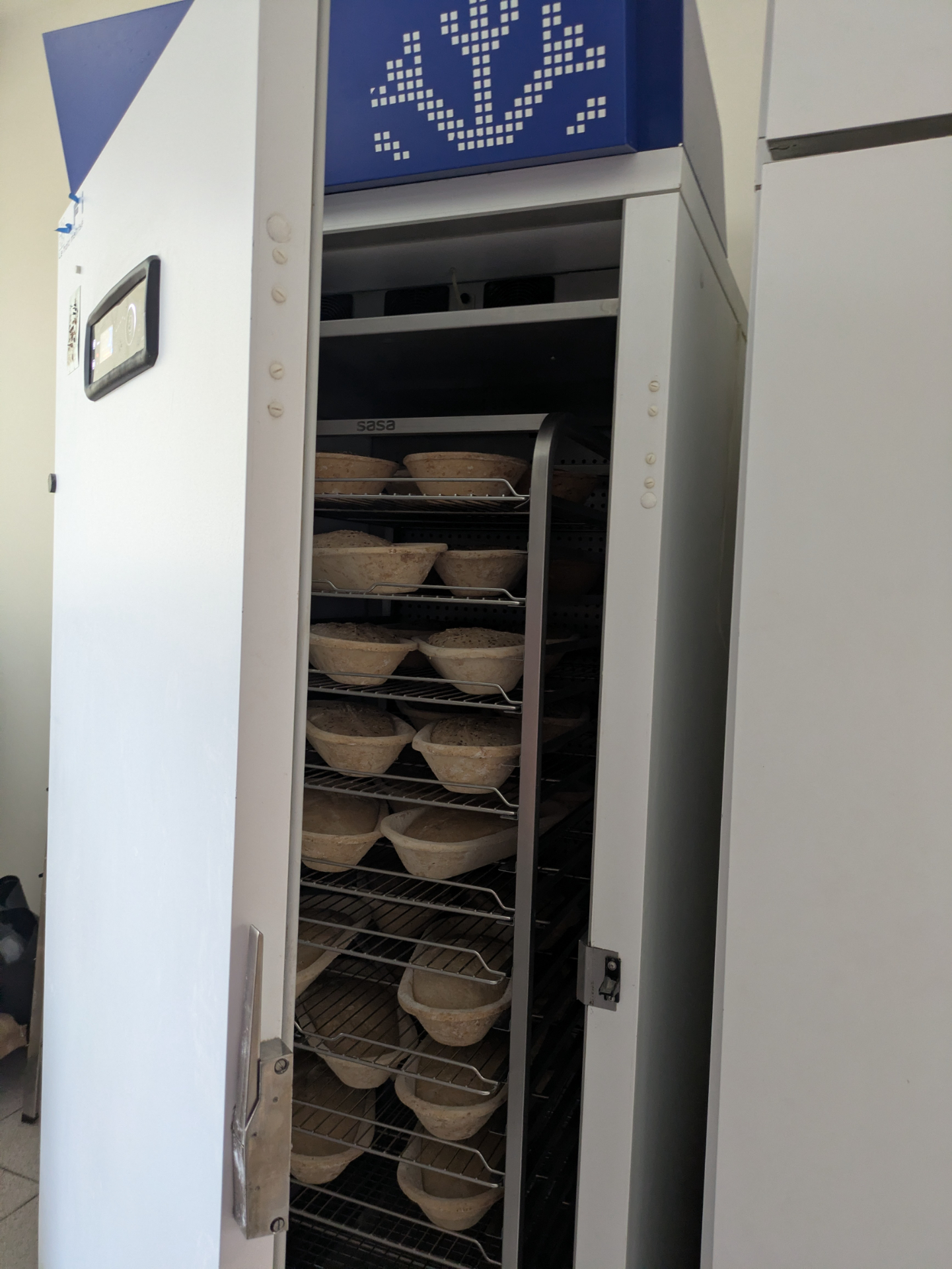
Once upon a time, my baker friends asked me: “Does it take longer for the temperature of an empty fridge to become uniform than a full one?” While the question initially sounded counterintuitive (a full fridge requires removing far more stored thermal energy), I realized it would make a great illustrative simulation to showcase the capabilities of conjugate heat transfer (CHT) solvers in OpenFOAM.
To answer this, we will run two simulations: an empty fridge and a fridge fitted with a shelf rack.
Empty fridge
The empty fridge scenario is the simplest setup; we use the
buoyantBoussinesqPimpleFoam solver. Because the fridge is a cuboid measuring
0.85 × 0.66 × 1.85 m, we use an orthogonal mesh with a cell
size of 1 cm. A quick literature review indicates that industrial
bakery refrigerators typically have a constant wall heat transfer coefficient of
6 W/(m2K), so we apply the externalWallHeatFluxTemperature
boundary condition across all walls. The ambient external temperature is set to
5 °C (278.15 K) with an initial internal temperature of
20 °C. While we could assign varied heat transfer coefficients to
different walls for precision, using a uniform value works well for a first
iteration.
walls
{
    type            externalWallHeatFluxTemperature;
    mode            coefficient;
    Ta              constant 278.15;
    h               constant 6.0;
    kappaMethod     function;
    kappaValue      constant 25.87e-3;
    alphaValue      constant 2.135855960582023e-05;
    value           $internalField;
}
To record internal temperatures, we place numerical probes at various heights along the vertical centerline.
probes
{
    type    probes;
    libs    (sampling);

    name    probes;

    writeControl   adjustableRunTime;
    writeInterval  0.1;

    fields (T);

    probeLocations
    (
        ( 42.5E-2 33E-2   5e-2)
        ( 42.5E-2 33E-2  15e-2)
        ...
        ( 42.5E-2 33E-2 155e-2)
        ( 42.5E-2 33E-2 165e-2)
        ( 42.5E-2 33E-2 175e-2)
    );
}
In the empty fridge, cold air near the refrigerated walls sinks due to buoyancy. This forms a large recirculation loop that brings the internal air temperature to a quasi-uniform state (dropping from 20 °C down to 5 °C) in roughly 10 minutes.
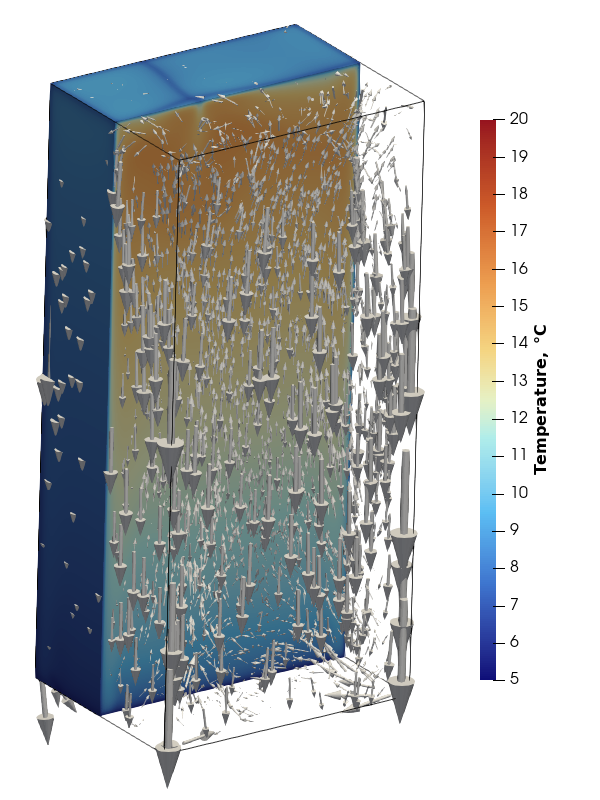
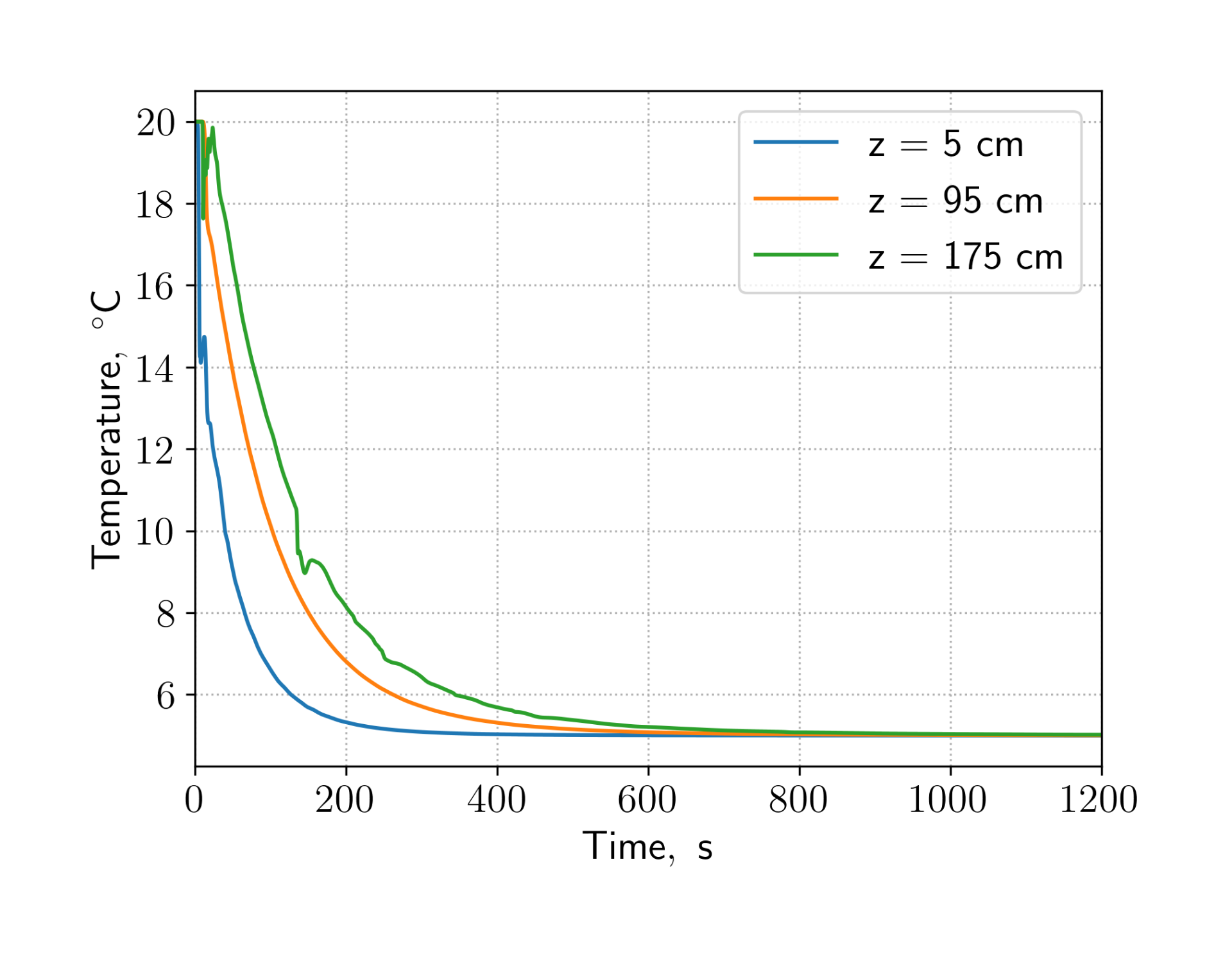
This timeframe aligns closely with real-world observations.
Fridge with a shelf
Creating the shelf geometry
The shelf is modeled as a assembly of hollow stainless steel bars: four vertical posts, eight horizontal perimeter bars at the top and bottom, and 20 side-rails (10 per side) for holding trays.
Given the repetitive structure, OpenSCAD was the ideal tool for generating this geometry. First, we set the parameters:
dx = 0.8;
dy = 0.624;
dz = 1.8;

dh = 18e-2;

thickness = 2e-3;
width = 2.54E-2;
We generate the outer shell of the rack and subtract a slightly smaller inner volume to model the hollow interior.
    cube([dx, width, width]);
    translate([0, dy, 0])
        cube([dx, width, width]);
    translate([0, dy, dz - width])
        cube([dx, width, width]);
    translate([0, 0, dz - width])
        cube([dx, width, width]);

    cube([width, dy, width]);
    translate([dx, 0, 0]) cube([width, dy, width]);
    translate([dx, 0, dz - width]) cube([width, dy, width]);
    translate([0, 0, dz - width]) cube([width, dy, width]);

    for (i = [1:9]) {
        translate([0, 0, dh*i]) cube([dx, width, width]);
        translate([0, dy, dh*i]) cube([dx, width, width]);
    }

    for (i = [0:5]) {
        for (j = [1:9]) {
            translate([dw*i, 0, dh*j])
                cube([width, dy, width]);
        }
    }
}

union() {
    translate([thickness, thickness, thickness])
        cube([width_in, width_in, dz - 2*thickness]);

    translate([thickness, dy + thickness, thickness])
        cube([width_in, width_in, dz - 2*thickness]);

    translate([dx + thickness, dy + thickness, thickness])
        cube([width_in, width_in, dz - 2*thickness]);

    translate([dx + thickness, thickness, thickness])
        cube([width_in, width_in, dz - 2*thickness]);

    translate([thickness, thickness, thickness])
        cube([dx, width_in, width_in]);
    translate([thickness, dy + thickness, thickness])
        cube([dx, width_in, width_in]);
    translate([thickness, dy + thickness, dz - width_in - thickness])
        cube([dx, width_in, width_in]);
    translate([thickness, thickness, dz - width_in - thickness])
        cube([dx, width_in, width_in]);

    translate([thickness, thickness, thickness])
        cube([width_in, dy, width_in]);
    translate([dx + thickness, thickness, thickness])
        cube([width_in, dy, width_in]);
    translate([dx + thickness, thickness, dz - width_in - thickness])
        cube([width_in, dy, width_in]);
    translate([thickness, thickness, dz - width_in - thickness])
        cube([width_in, dy, width_in]);

    for (i = [1:9]) {
        translate([thickness, thickness, dh*i + thickness]) cube([dx, width_in, width_in]);
        translate([thickness, dy + thickness, dh*i + thickness]) cube([dx, width_in, width_in]);
    }

    for (i = [0:5]) {
        for (j = [1:9]) {
            translate([dw*i + thickness, thickness, dh*j + thickness])
                cube([width_in, dy, width_in]);
        }
    }
}
}
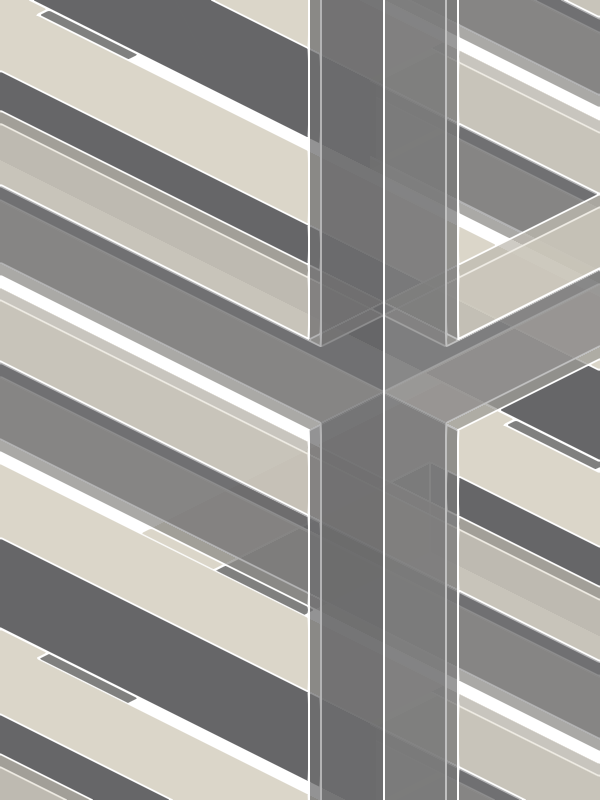
Exporting to STL yields the final rack structure:
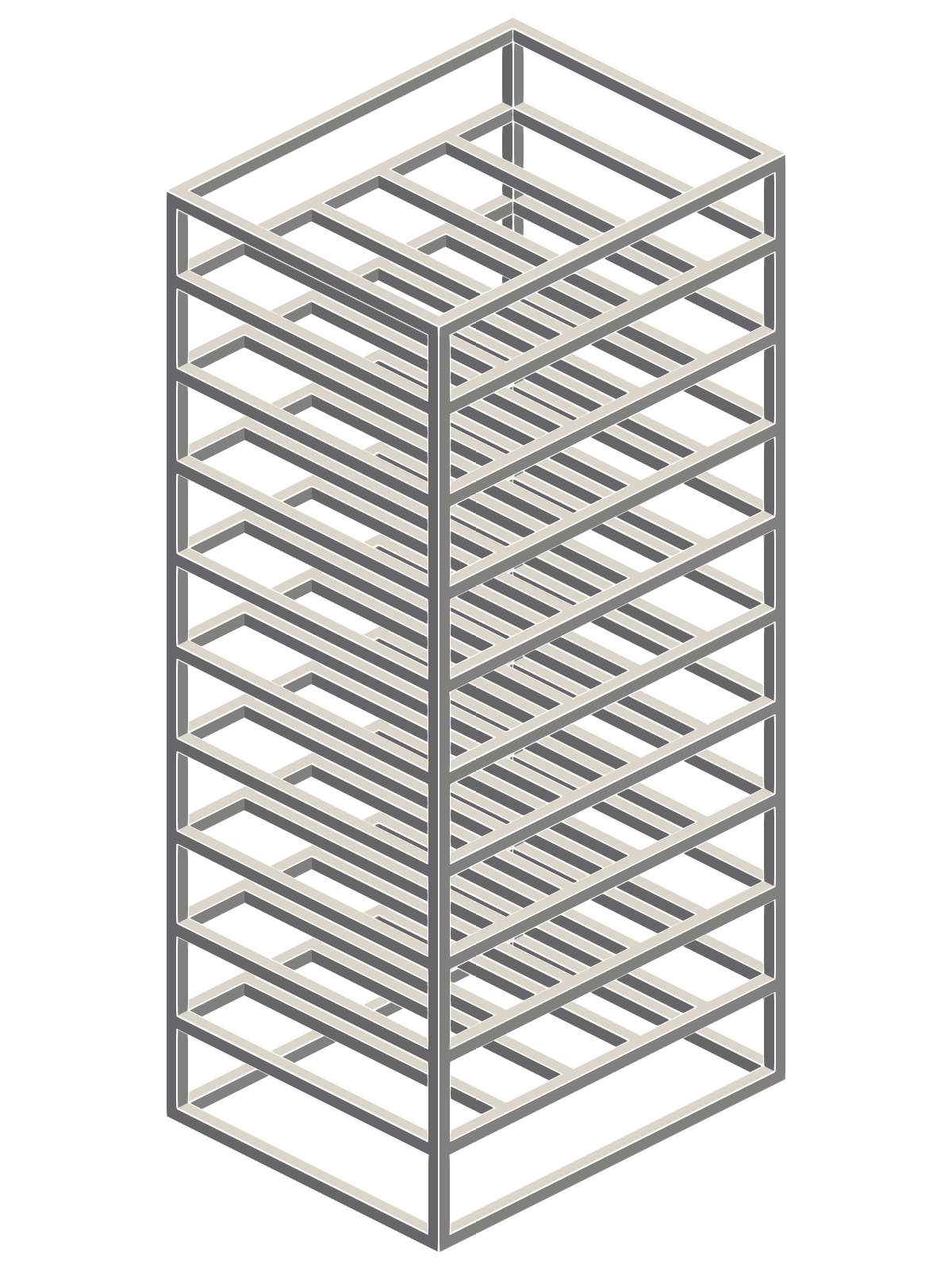
Because the rack is hollow, the image below illustrates the outer surface in beige, the internal cavities of the rails in gray, and the STL mesh boundaries in white:
Implementing Multi-Region Convergence Controls
When writing custom solvers, I typically include convergence controls regardless
of whether they are single- or multi-region. Surprisingly, standard OpenFOAM CHT
solvers lack built-in convergence controls. SIMPLE-based solvers default to
running a number of time steps specified by endTime, while transient
PIMPLE solvers execute a fixed count of outer iterations.
One quick workaround is setting a high outer iteration limit to ensure physical convergence, but implementing native convergence controls sounded like a lot more fun - and far more efficient, as it lets us stop iterations as soon as convergence is reached.
OpenFOAM reuses code by generating field collections for each region. On every
iteration, it binds these regional fields to standard variable names (e.g., in
UEqn.H). For steady-state SIMPLE solvers, we can adapt this design:
instantiate a simpleControl object per region, iterate through them at the end
of every SIMPLE step, and terminate the run once all regions satisfy convergence
criteria.
For transient PIMPLE solvers, execution is slightly more nuanced. The solver iterates through outer correctors within each time step. Once residual metrics fall below configured tolerances, the step is deemed converged, and a final corrector pass runs using dedicated linear solver settings (typically zero relative tolerance and tight absolute tolerances) to ensure numerical stability.
Rather than manually querying algorithm flags inside chtMultiRegionFoam:
for (int oCorr=0; oCorr<nOuterCorr; ++oCorr)
{
	const bool finalIter = (oCorr == nOuterCorr-1);
	...
}
We refactor the loop to mirror standard single-region solvers like pimpleFoam:
while (pimple.loop())
{
	...
	while (pimple.correct())
    {
		...
    }
}
The underlying class design includes:
- Region Solution Control: Evaluates local residual convergence.
- Multi-Region Solution Control: Coordinates regional controls, checking if all regions have converged to either advance time steps or conclude the run.
SIMPLE Solution Controls
Implementation for the SIMPLE algorithm is straightforward: we store
simpleControl instances in a list and invoke criteriaSatisfied(). Once
fulfilled, solver execution halts.
The alterations to chtMultiRegionSimpleFoam are minimal. We replace:
while (runTime.loop())
{
	...
}
with
while (msimple.loop())
{
	...
}
Additionally, rather than manually constructing energy looping loops, we
delegate iteration directly to msimple.energyCoupling().
PIMPLE Solution Controls
For PIMPLE multi-region control, pimpleControl instances manage individual
residual targets. However, mpimple.loop() must evaluate global status and
trigger a final corrector pass once criteria across all regions are met.
The solver loop is simplified accordingly: outer correctors use the multi-region interface, which dispatches controls to inner and non-orthogonal corrector routines.
The full solver modifications are available on GitLab: https://gitlab.com/alexey.matveichev/openfoam
Cooling behavior with the shelf
With dynamic convergence verification operational, we can confidently run the rack simulation.
We mesh the geometry using snappyHexMesh. To minimize mesh non-orthogonality,
we stop at the castellated stage. To accurately capture the thin stainless steel
walls, the mesh is refined around edges and faces, applying two refinement
levels relative to the 1 cm background grid:
features
(
	{
        file "echelle.extendedFeatureEdgeMesh";
        level 2;
    }
);

refinementSurfaces
{
    echelle
    {
        level (2 2);
    }
}
We define distinct domain regions using locationsInMesh:
locationsInMesh
(
    (( 1e-4 1e-4  1e-4) air)
    (( 0.013  0.006  0.026) inox)
    (( 0.01600001  0.01000001  0.03000001) air-inside-echelle)
);
This creates three region zones: main cabinet air, the solid rack frame, and
internal hollow air pockets. Running splitMeshRegions converts these cell
zones into individual regional meshes. Off-grid coordinate values prevent points
from falling directly on boundary faces.
To prevent numerical difficulties, the stagnant air enclosed inside the hollow rack profiles is modeled as a solid. Because OpenFOAM normalizes residuals using field variations, fully converged yet uniform fluid zones can produce lingering normalized residuals near ∼1.0. Treating static internal air pockets as solids circumvents unneeded momentum calculation overhead.
Initial temperatures for both the air and the shelf are set to 20 °C, matching the empty fridge thermal parameters.
Simulation results
Inserting the rack significantly alters cabinet flow dynamics. The single macro-recirculation cell breaks apart into numerous isolated localized loops constrained between rack shelves. Downward flow persists along cold outer boundary walls, but buoyancy forces drive localized upward currents along the shelf’s internal frame.
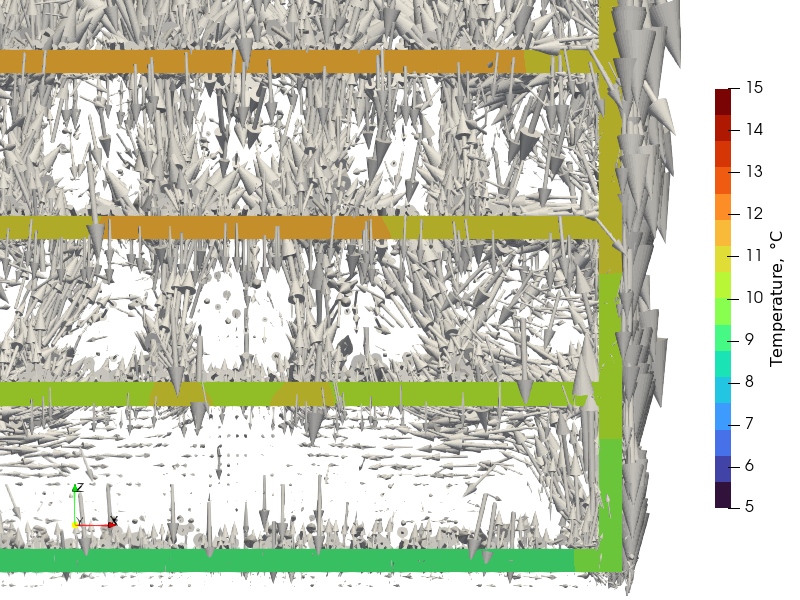
This compartmentalized flow severely slows overall heat removal. Cooling is delayed not only by the additional thermal mass of the metal, but primarily by the disruption of free-convective mixing. The bottom zone cools somewhat faster due to direct contact with the base floor without horizontal obstruction. Near the top shelf, minor temperature fluctuations occur due to competing heat fluxes: wall cooling pulling energy out, balanced against rising warm plumes from the steel frame.
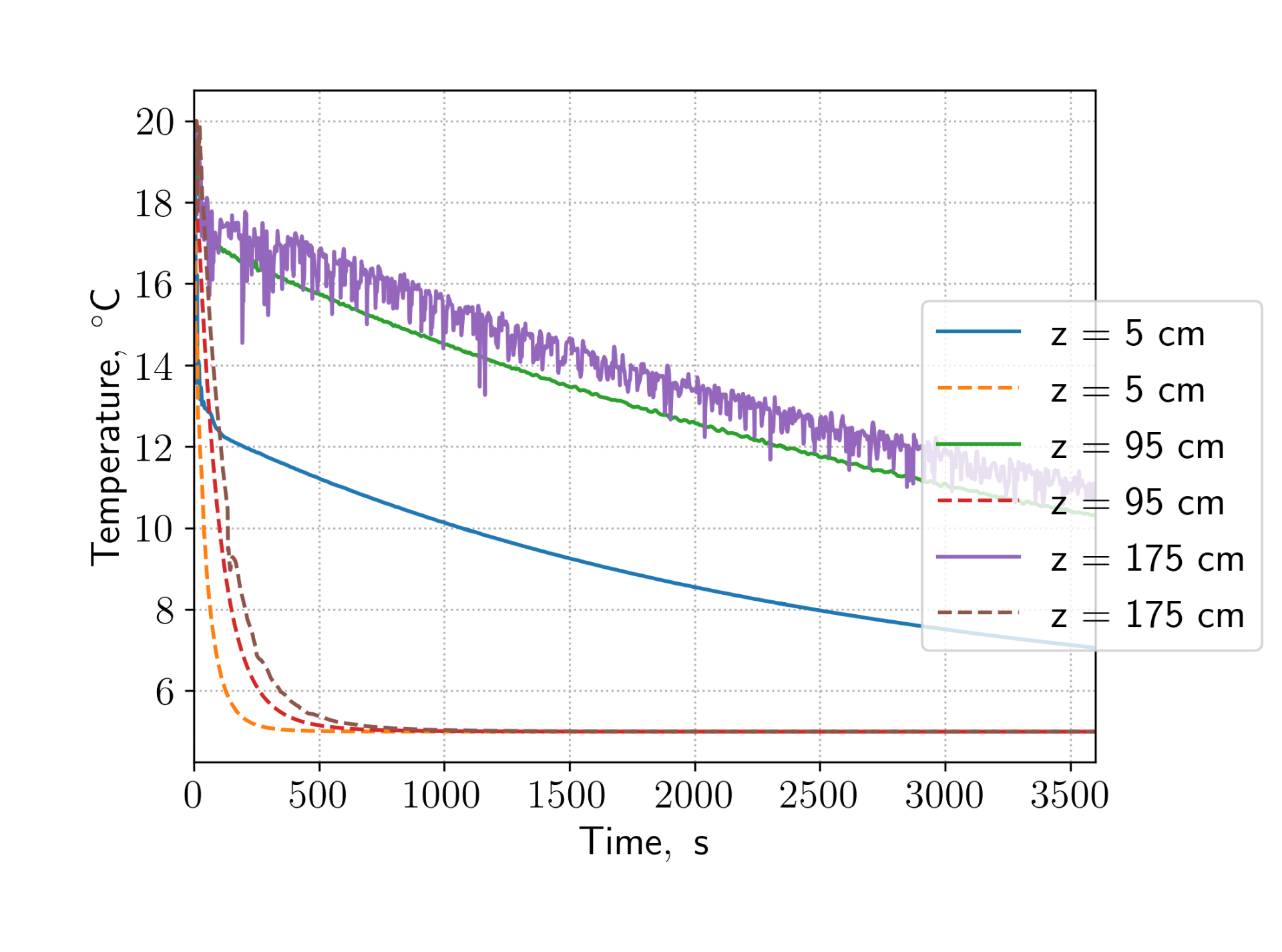
Ultimately, introducing structural shelves creates significant vertical temperature gradients, which could negatively impact commercial baking processes where consistent dough proofing temperatures are required.
Does Pre-Cooling Help?
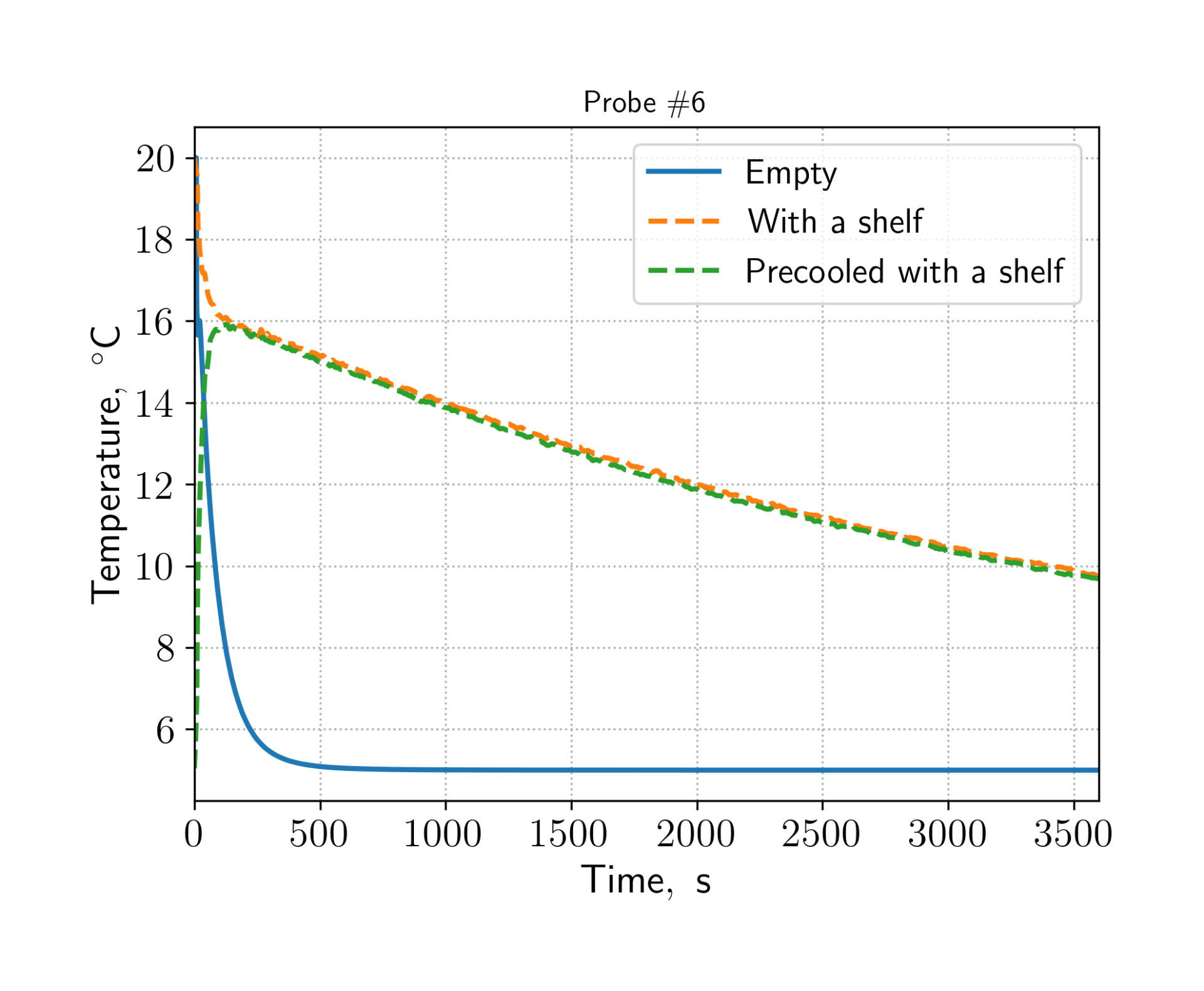
To test if pre-chilling mitigates flow disruption, we simulated pre-cooling the empty fridge to 5 °C for 10 minutes before inserting a 20 °C shelf.
The results show that pre-cooling provides virtually no long-term benefit. Heat transfer from the warm rack rapidly warms localized air cells, and within 60 seconds, thermal profiles match those of an initially uncooled cabinet.
You can find the case files in the show case repo: https://code.o2m.solutions/o2m/show-cases/src/branch/trunk/fridge