Blog : Let's put a sphere in a tube
This post is a continuation of the Von Kármán vortex street simulation series.
This time, we extend the domain into 3D and generate the computational mesh
using snappyHexMesh. Because the geometry is relatively straightforward, we use
OpenFOAM’s native searchable surfaces instead of external STL files.
Geometry and Mesh
This simulation is a 3D extension of the classic Von Kármán vortex street. Instead of a flat 2D geometry, we use a cylindrical tube with a diameter of 4D and place a sphere of diameter D inside. We apply a uniform inlet velocity and observe the 3D development of the wake flow.
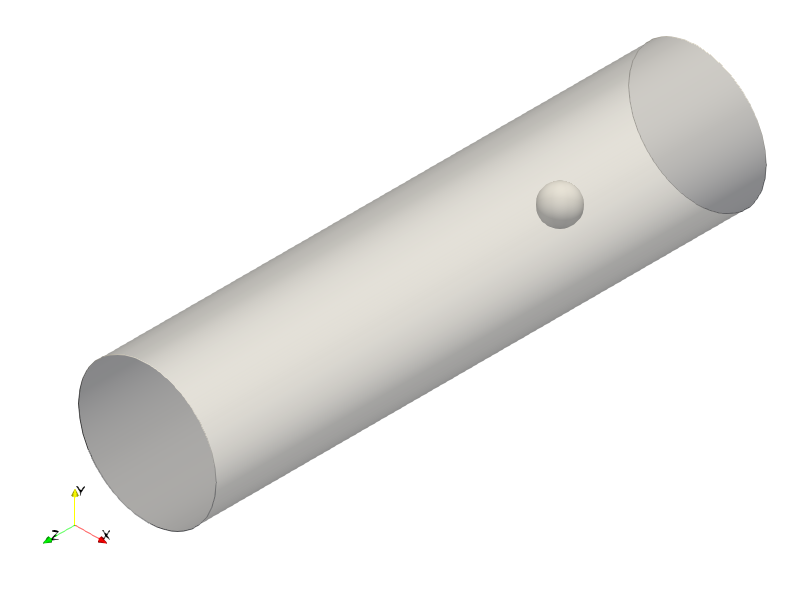
The mesh is generated using snappyHexMesh. Because our domain consists of
basic geometric primitives, we use built-in geometry objects
(searchableCylinder and searchableSphere) instead of importing external STL
files:
geometry
{
    tube
    {
        type searchableCylinder;
        point1 (0 0 -100);
        point2 (0 0 100);
        radius #eval "2*$D";
    }

    sphere
    {
        type searchableSphere;
        origin (0 0 0);
        radius #eval "0.5*$D";
    }
}
For the castellated mesh stage, we refine only the surface boundaries. Because the primitives are smooth and continuous, feature edge extraction is unnecessary (even the inlet and outlet are defined by the bounding box of the background mesh):
    refinementSurfaces
    {
        sphere
        {
            level (1 1);
        }

        tube
        {
            level (1 1);
        }
    }
To resolve boundary layer gradients along the smooth surfaces, we add prismatic inflation layers:
    layers
    {
        sphere
        {
            nSurfaceLayers 3;
        }

        tube
        {
            nSurfaceLayers 3;
        }
    }
The remainder of snappyHexMeshDict uses standard parameters.
Running snappyHexMesh yields a clean mesh with a maximum non-orthogonality
around 50°:
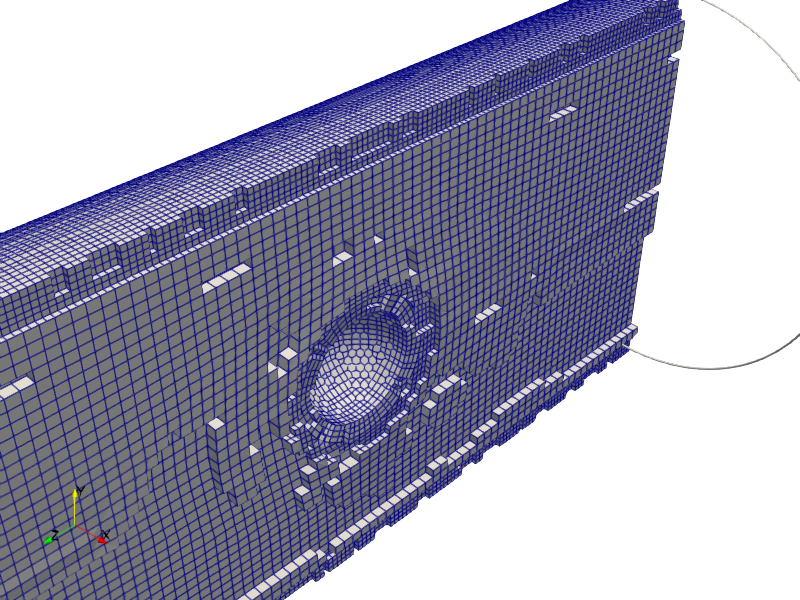
Note: To prevent ParaView from displaying clipped boundary cells incorrectly, the Crinkle clip option is activated.
Checking geometry...
    Overall domain bounding box (-2 -2 -4) (2 2 12)
    Mesh has 3 geometric (non-empty/wedge) directions (1 1 1)
    Mesh has 3 solution (non-empty) directions (1 1 1)
    Boundary openness (-3.15769e-16 2.9073e-16 7.81195e-17) OK.
    Max cell openness = 4.07388e-16 OK.
    Max aspect ratio = 4.04672 OK.
    Minimum face area = 0.000805246. Maximum face area = 0.013633.  Face area magnitudes OK.
    Min volume = 4.0276e-05. Max volume = 0.00125246.  Total volume = 200.51.  Cell volumes OK.
    Mesh non-orthogonality Max: 50.0132 average: 7.10234
    Non-orthogonality check OK.
    Face pyramids OK.
    Max skewness = 0.377543 OK.
    Coupled point location match (average 0) OK.
Flow Conditions and Fluid Properties
As in the 2D case, we specify a constant inlet velocity (Uin) and vary the
kinematic viscosity (nu) to achieve the targeted Reynolds number (Re). This is
configured dynamically using the #eval entry in constant/transportProperties:
#include "<case>/settings"

transportModel Newtonian;

nu              #eval "$Uin*$D/$Re";
The variables Uin, D, and Re are defined in the settings dictionary within the
case folder.
Visualizing the Flow
In 2D simulations, plotting force coefficients or mid-plane velocity contour maps gives a clear picture of the flow field. In 3D, however, mid-plane slices often fail to capture the complex vortex shedding around the sphere.
A superior visualization approach is tracing 3D streamlines.
Generating Streamlines
ParaView Approach
ParaView offers two primary methods for seeding streamlines:
- Stream Tracer: Seeds points using basic geometric primitives (e.g., points, lines, or spheres).
- Stream Tracer With Custom Source: Uses an arbitrary source geometry to define seed point locations.
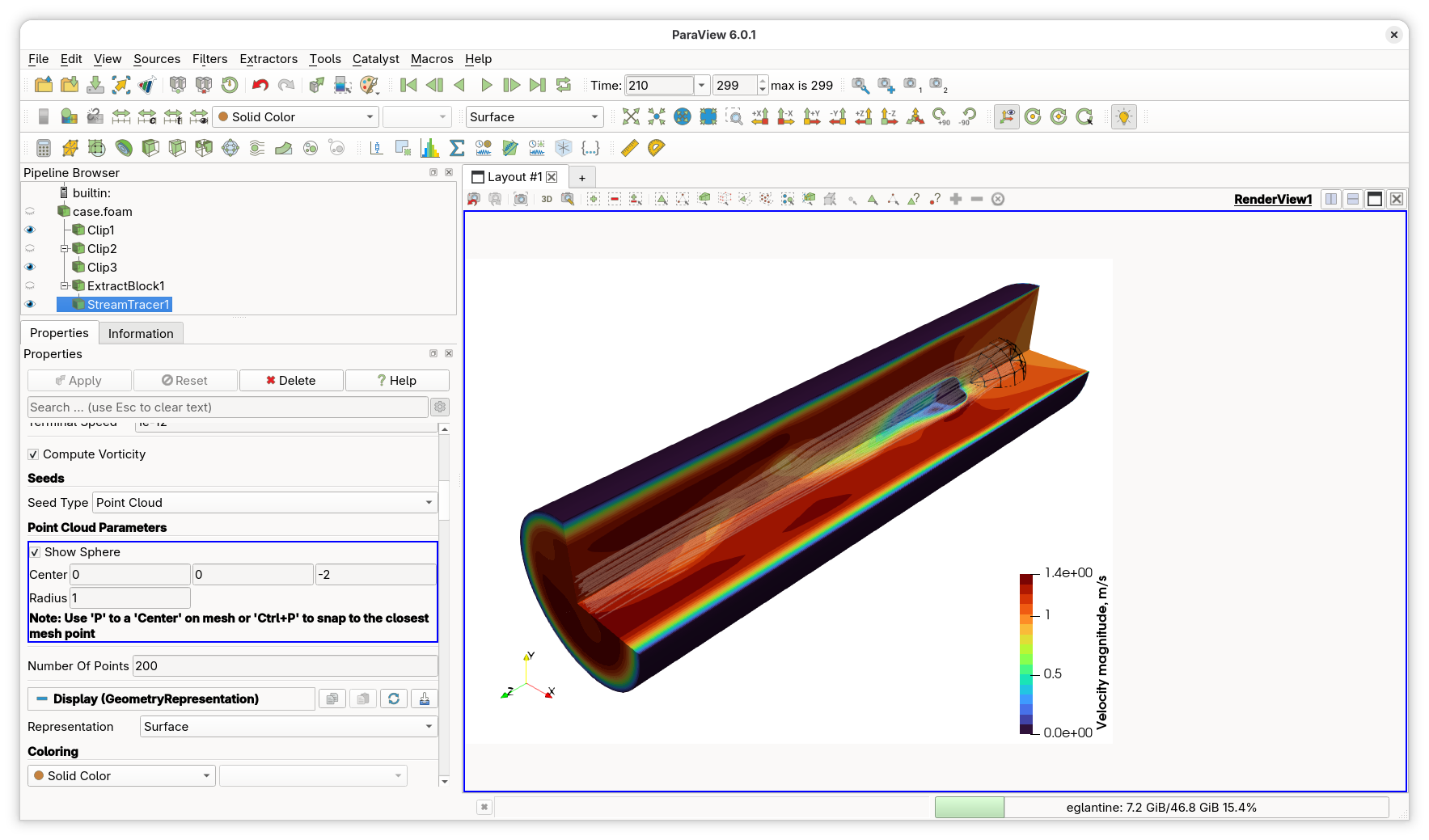
To study the flow structures originating directly ahead of the obstacle, it is useful to seed streamlines within a circular area on the inlet plane corresponding to the sphere’s projection. We can create this custom seeding source in ParaView using the following pipeline:
- Extract Block: Isolates the inlet boundary patch.
- Delaunay 2D: Triangulates the patch geometry to prepare it for refinement.
- Loop Subdivision: Refines the triangulated surface mesh.
- Clip (Cylinder): Clips the refined patch to create a circular seeding disk of the desired radius.
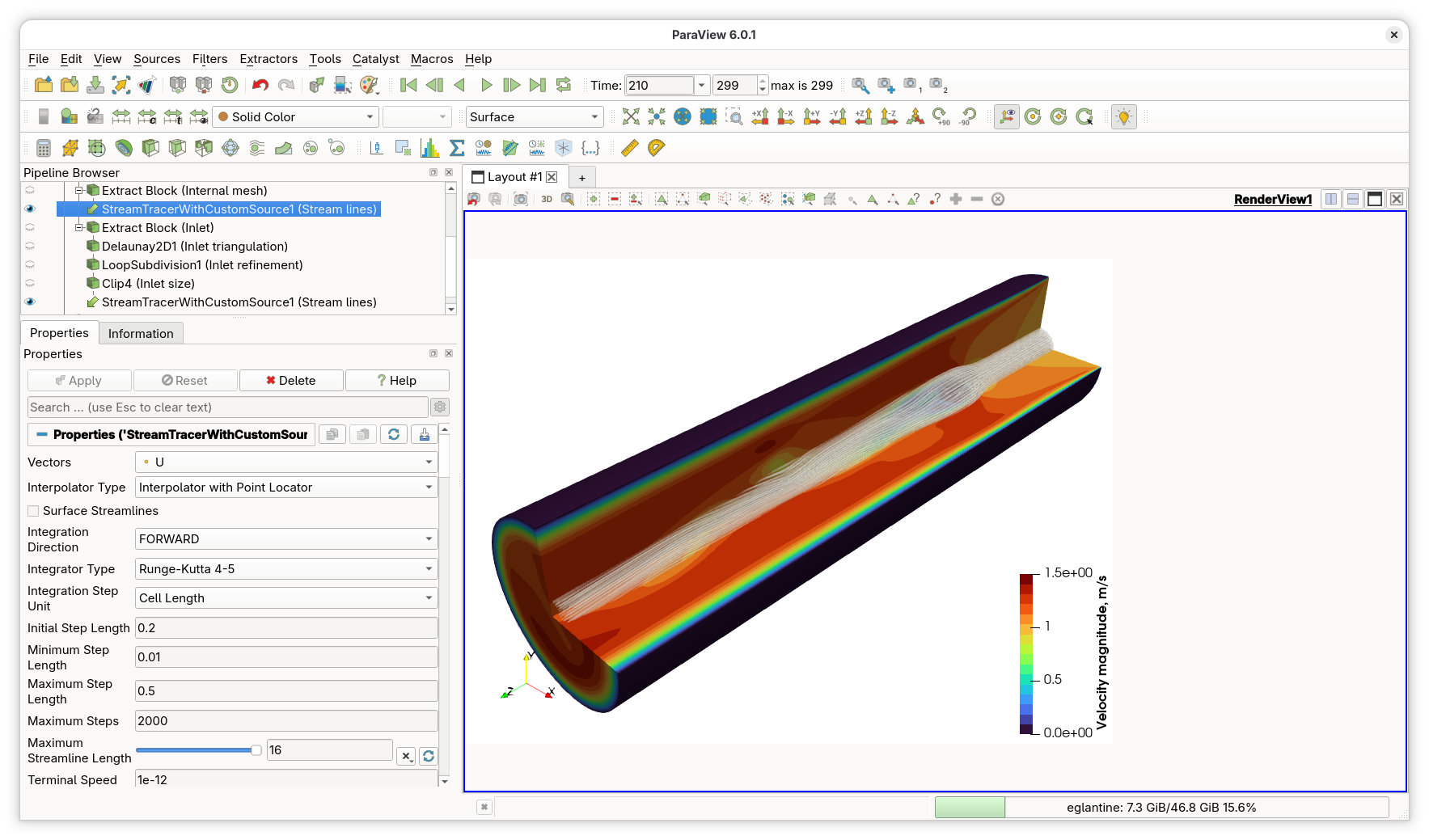
By shrinking the radius of this custom source, we can clearly visualize the intricate, swirling streamline patterns forming in the sphere’s wake:
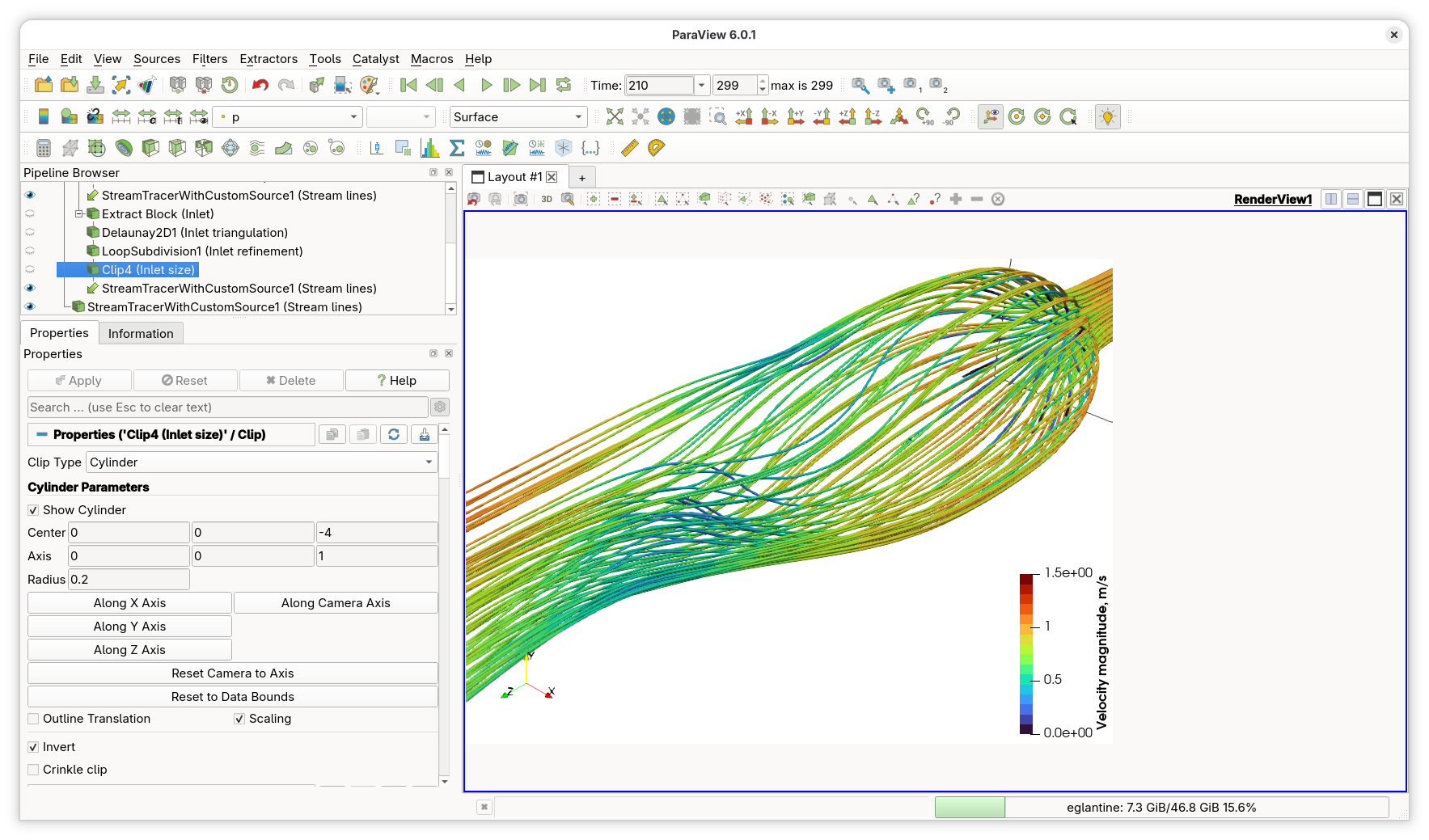
Finally, applying the Stream Tracer filter produces smooth flow animations:
OpenFOAM streamLine Function Object
Streamlines can also be computed directly during runtime or post-processing
using OpenFOAM’s streamLine function object. The function object seeds
Lagrangian particles, tracks their trajectories through the velocity field, and
writes the resulting paths in VTK format.
However, built-in seeding options are somewhat limited. The closest native
option is patchSeed, which distributes a set number of points across an entire
boundary patch. If applied directly to our inlet patch, patchSeed generates many
uninteresting, straight streamlines near the tube outer walls.
To restrict seeding to a specific region, we need a faceZoneSeed method. By
combining this with topoSet, we can define a small sub-zone on the inlet.
Implementing faceZoneSeedSet
Inspecting OpenFOAM’s patchSeedSet class reveals that it relies on
triangulatedPatch to distribute seed points across patch faces. Since a
faceZone can be evaluated similarly, we can easily implement a custom
faceZoneSeedSet class.
We adapt patchSeedSet by replacing patchSet_ with faceZoneName_ and dropping
selectedLocations_:
class faceZoneSeedSet
:
    public sampledSet
{
    // Private Data
        //- Face zone name to sample
        const word faceZoneName_;

        //- Maximum number of zone faces to seed
        const label maxPoints_;

        //- Random number generator
        autoPtr<Random> rndGenPtr_;

    // Private Member Functions
        //- Calculate distribution points on the face zone
        void calcZoneSamples
        (
            const label nAvailable,
            const label nZonePoints,
            DynamicList<point>& samplingPts,
            DynamicList<label>& samplingFaces,
            DynamicList<label>& samplingSegments,
            DynamicList<scalar>& samplingCurveDist
        );

public:
    //- Runtime type information
    TypeName("faceZoneSeed");

    // Constructors
    faceZoneSeedSet
    (
        const word& name,
        const polyMesh& mesh,
        const meshSearch& searchEngine,
        const dictionary& dict
    );
};
Seed positioning occurs inside calcZoneSamples, which mimics
calcPatchSamples from patchSeedSet:
void Foam::faceZoneSeedSet::calcZoneSamples
(
    const label nAvailable,
    const label nZonePoints,
    DynamicList<point>& samplingPts,
    DynamicList<label>& samplingFaces,
    DynamicList<label>& samplingSegments,
    DynamicList<scalar>& samplingCurveDist
)
{
    if (nAvailable < 1) return;

    Random& rndGen = *rndGenPtr_;

    globalIndex globalSampleNumbers(nAvailable);
    label nGlobalPatchPoints = returnReduce(nZonePoints, sumOp<label>());

    point pt;
    label facei;

    const faceZone& fz = mesh().faceZones()[faceZoneName_];
    triangulatedFaceZone tfz(fz);

    const label np = nAvailable * fz.size() / scalar(nGlobalPatchPoints);
    for (label i = 0; i < np; ++i)
    {
        tfz.randomLocalPoint(rndGen, pt, facei);

        samplingPts.append(pt);
        samplingFaces.append(fz[facei]);
        samplingSegments.append(0);
        samplingCurveDist.append(globalSampleNumbers.toGlobal(i));
    }
}
The algorithm calls randomLocalPoint via triangulatedFaceZone. Since streamline
particles reside in cell volumes, we map boundary faces to interior cells using
faceOwner():
labelList samplingCells(samplingFaces.size(), -1);

forAll(samplingFaces, i)
{
    samplingCells[i] = mesh().faceOwner()[samplingFaces[i]];
}
The complete source code for the classes can be found in the show cases repository.
Configuration & Results
We configure topoSetDict to define the target faceZone (smallInlet):
actions
(
  {
    name f0;
    type faceSet;
    action new;
    source patchToFace;
    sourceInfo
    {
      patch inlet;
    }
  }

  {
    name f0;
    type faceSet;
    action subset;
    source cylinderToFace;
    sourceInfo
    {
      point1 (0 0 -100);
      point2 (0 0 100);
      radius 0.2;
    }
  }

  {
    name smallInlet;
    type faceZoneSet;
    action new;
    source setToFaceZone;
    sourceInfo
    {
      faceSet f0;
    }
  }
);
And the following streamLine function object configuration:
type        streamLine;
libs        (fieldFunctionObjects libfaceZoneSeed);
setFormat   vtk;

direction   forward;
fields      (p U);
lifeTime    10000;
nSubCycle   5;
cloud       particleTracks;

seedSampleSet
{
    type        faceZoneSeed;
    axis        xyz;
    zone        smallInlet;
    maxPoints   200;
}
Executing the function object yields the following streamline trajectories:
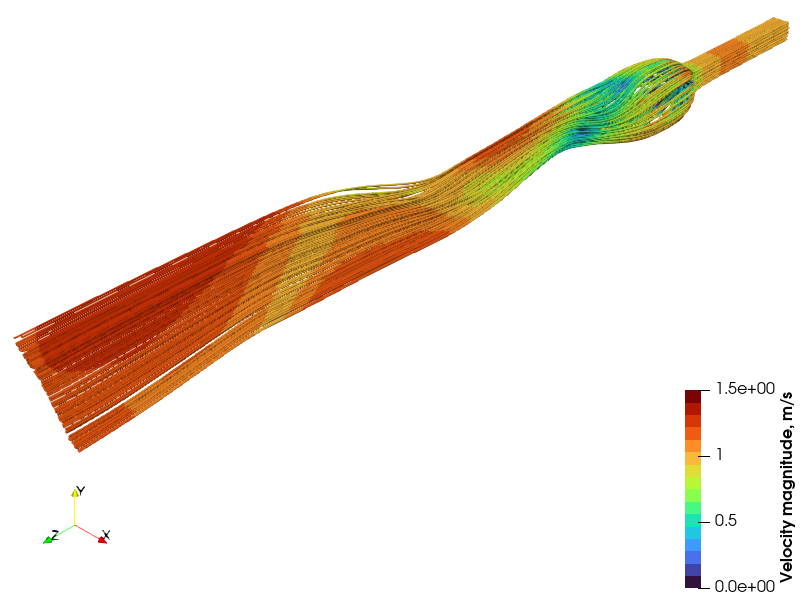
Note: Because the background inlet mesh is relatively coarse, the faceZone
seed boundary appears blocky/square. In ParaView, refining and triangulating the
extracted patch prior to clipping produces a significantly smoother circular
seed profile.
The case files can be found in the show cases repository.